
Saving and Autosaves
Writing & Edit Takashi Suzuki. . . .
- Subject: Demo
- Reference information
- Check date
- Introducing
- Description of the confirmation method
To save manually in DQM4, choose Menu > System > Save. Autosave runs after battles and map transitions. Before transferring demo data, arrange the party and standby, then save manually.
If you want to leave the current composition before you finish it, use the save on the menu. Some scenes are automatically saved, so it's important to take over Demo and save the last person in the setting to take to Demo.
When you want to save it right away,
You open the menu during your adventure and select "system" from "Save." You can use it when you want to save a state before the distribution or when you want to change the composition and finish the game.
Autosave Cut
If you turn it off, you will see the "autosave" on and off. If you turn it off, you will have to save manually where you want to leave progress.
セーブデータは1つだけ
セーブデータを2つ、3つと分けることはできません。きょうだいで1つのゲーム機を使うときは、別のアカウントで遊ぶなどの工夫が必要です。
So I'm going to show you how to do that.
Select the "Save Data out of Options" from the title screen's "Options" menu. If you plan to take over your friends in Fullgae, please leave Demo's data until you have finished.
Demo Data
Demo's save data is used when taking friends to Fullgae.What will take over from DemoHey.
And I'm going to do this in a different way.
First, open a party and standby and make sure you have all the friends you left behind. Then run a manual save and then finish the game. If you want to depend on autosave, it's easier to make sure you don't know what was saved before.
Time to save your life.
| Timing | Why? |
|---|---|
| Before the exchange. | We're not going to have to go back to the code. |
| Before you go after your boss or your enemy. | You can save the state before the challenge. If autosave is in, the contents may change. |
| Before I finished the game. | We're not going to do that. |
| Last of Demo | After deciding who to take you to Full Game |
I'll be careful before I mix up.
If an autosave is on, then it can be saved immediately after the distribution. If you want to quit, you can't go back.It's a very simple thing to do.I'm putting it all together.
Can you cross-save the plane?
The same platform is required if you move from Demo to Full Game.Confirm when you can't take over.See, the function that we play together in an alien speciesCrossplayI'm sorry.
Manual save versus autosave
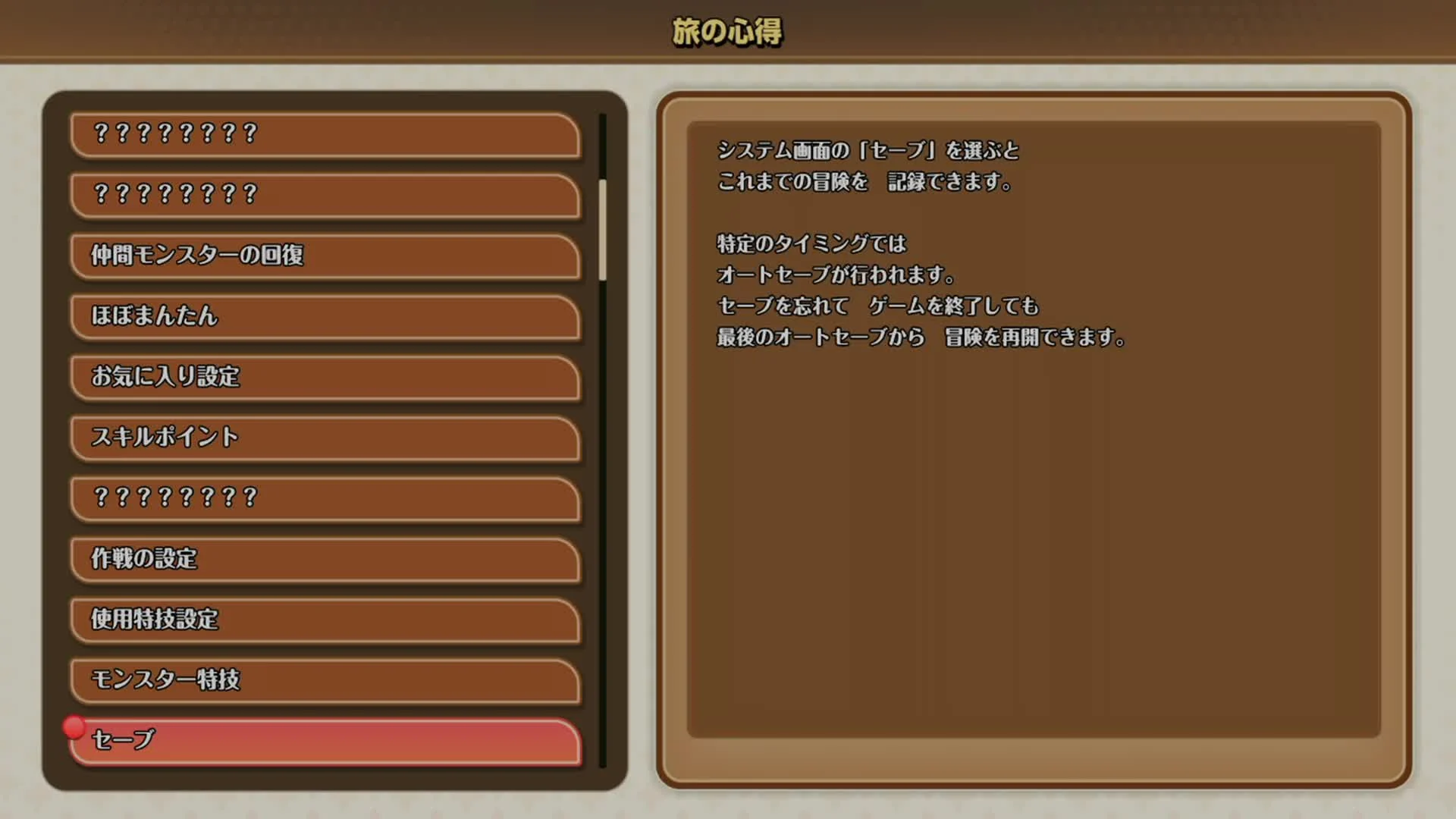
Use Save in the System menu to record your adventure manually. Autosaves occur at certain moments; they do not guarantee that everything immediately before quitting is saved. Save manually at a convenient stopping point so you know what was recorded.
Checked in the help screens of the supplied Japanese demo recording. Checked: 2026/11/20.
Reproduction or distribution of images used on this page whose rights are owned by co-authors represented by Square Enix Co., Ltd. is prohibited.
© ARMOR PROJECT/BIRD STUDIO/SQUARE ENIX
Image submission guidelines
Frequently asked questions
How should I save before transferring demo data?
To save manually in DQM4, choose Menu > System > Save. Autosave runs after battles and map transitions. Before transferring demo data, arrange the party and standby, then save manually.
Referenced Atlas Area Article
YouTube Channel
YouTube ChannelTakamasa Suzuki on YouTubeVisit the YouTube channel to explore the videos.Related GMNAVI.JP articles and YouTube videos
- GMNAVI.JPDQM4 articles on GMNAVI.JP
I've compiled articles on DQM4 other than the blog page. - GMNAVI.JPDraon Quantges (GMNAVI.JP)
This is the entrance to the series, such as Dracue 1.5.7/11, astortia's child's journey, Billers 2.
Continue with our related guide sites
Explore monsters from earlier games
To explore familiar DQM4 monsters in earlier games, open our series guides. Choose a game to continue to its monster locations and recruitment guides.
Browse guides by game Minecraft guidesFor Minecraft players, too
Visit our Minecraft guide site for your crafting and adventure questions. Find help for another game you enjoy alongside DQM4.
Read Minecraft guidesAsk questions on YouTube Community
You can share the combinations you found, team composition, and strategy questions.
Open YouTube CommunityYou promised to use it.
Don't write down names, schools, addresses, etc.